Santaimoto
Simplifying Service, Empowering Riders
Santaimoto
Client Work

Otomotif
Mobile App
Project timeline
2024
What we do
UI Design
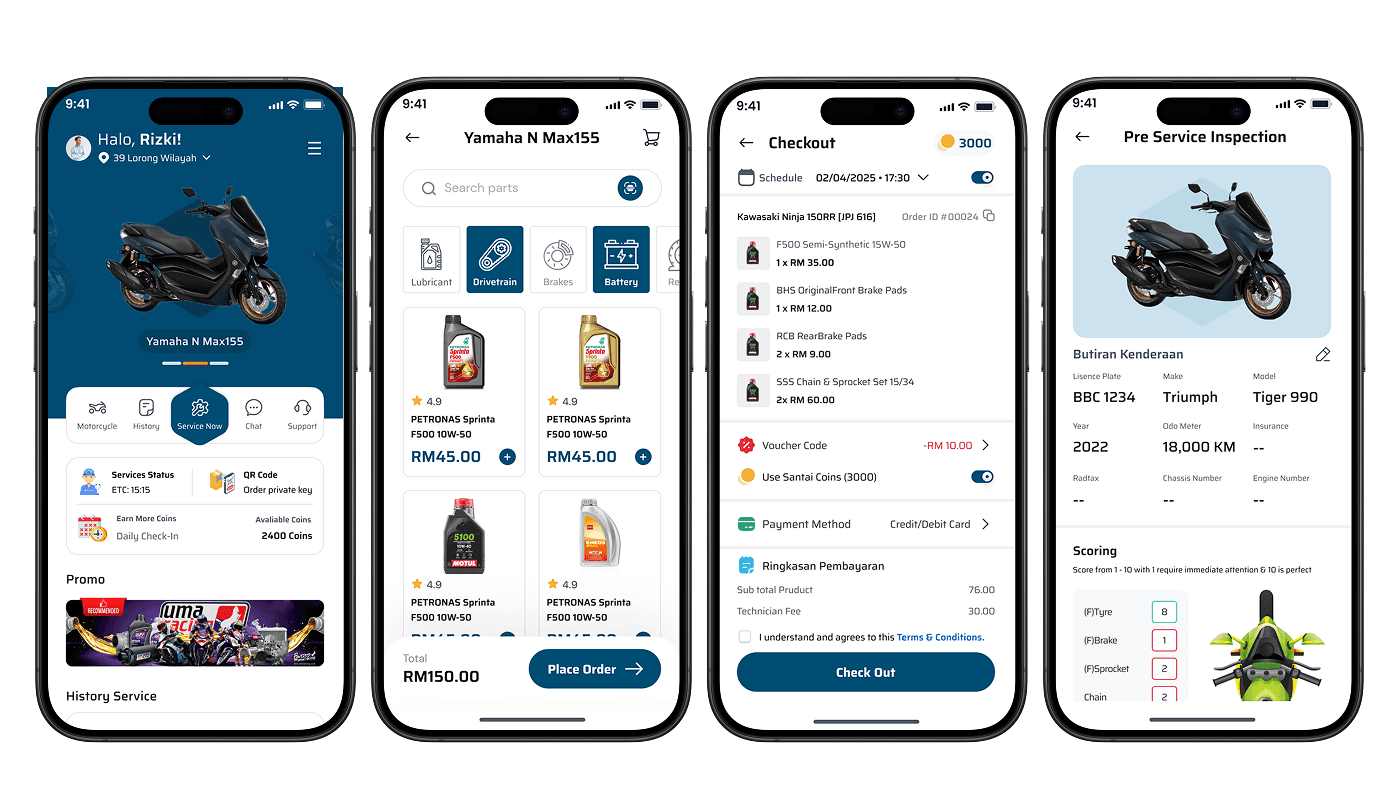
Redesigned a motorcycle service app to improve user flow across main, product search, checkout, and preservice screens. Focusing on clarity, task completion, and a smoother, more intuitive experience.
Service
Designing for MVP
To streamline the end-to-end service experience for motorcycle users from booking to checkout by improving clarity, navigation, and task flow across four key screens.
The Challange
The original app had inconsistent layouts, scattered actions, and lacked visual hierarchy, making it hard for users to find services, order parts, or complete bookings efficiently.
The Solution
We redesigned the main, search, checkout, and pre-service screens with a clean structure, grouped actions, persistent CTAs, and better use of space to guide users intuitively.
Home Screen
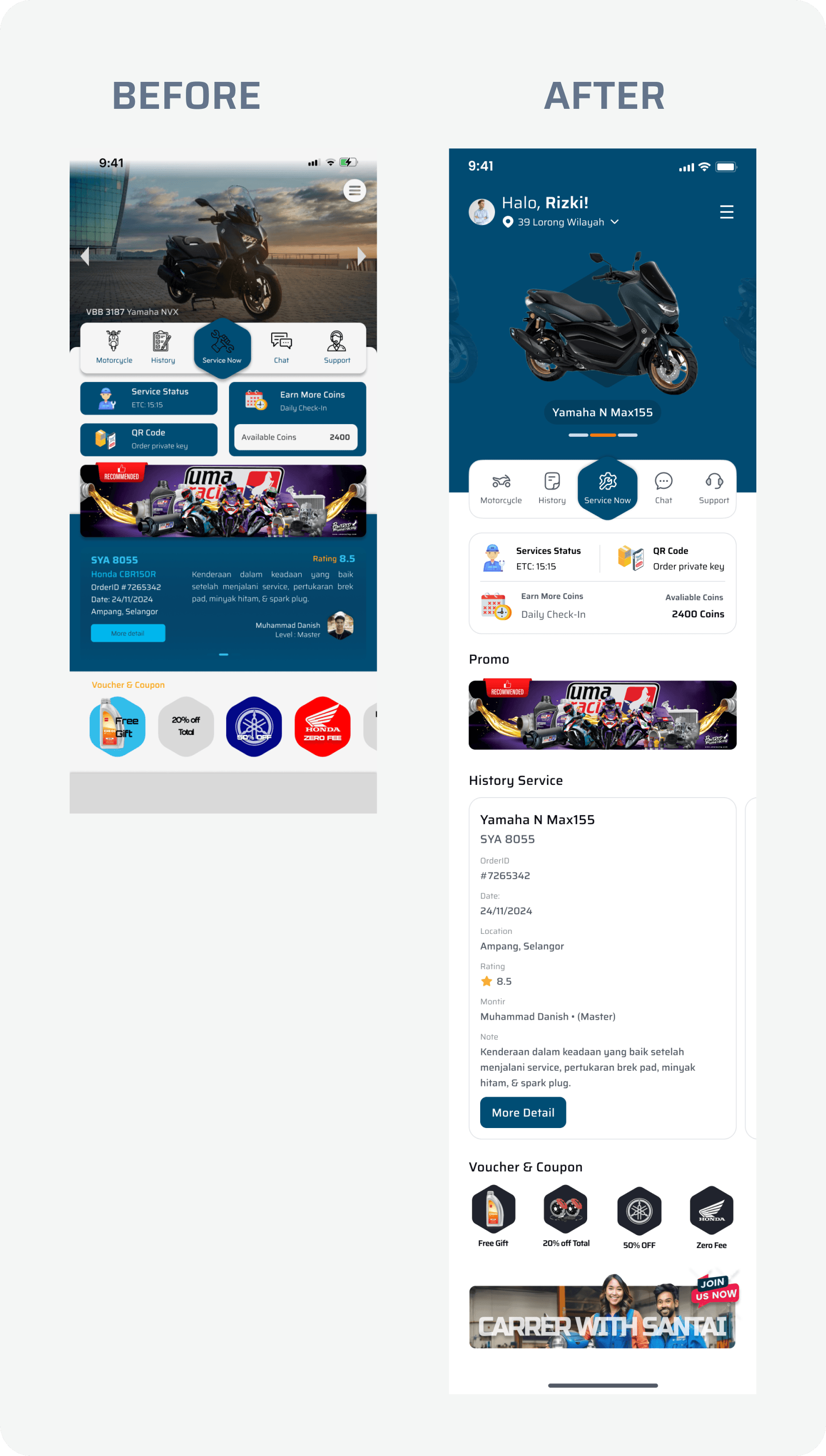
When reviewing the original home screen, we noticed users were overwhelmed by visual clutter important actions like “Service Now” and “Service Status” were lost between ads and coin systems. Our redesign focused on putting the rider’s main goal getting a service front and center.
We began by decluttering the header, giving the motorcycle image prominence while balancing it with the user’s name and location. The key actions were grouped into a consistent bottom bar: Motorcycle, History, Service, Chat, and Support. This ensured all core features were reachable with one tap.
The service status, coin rewards, and QR code were stacked neatly, creating a logical flow of what users can do next. We also ensured promos and vouchers stayed visible but secondary, so utility remained the hero of the screen.
This shift was driven by one insight: users come not to browse but to solve to book, check, or track their motor service. Design must serve that goal above all.
Search Product Screen
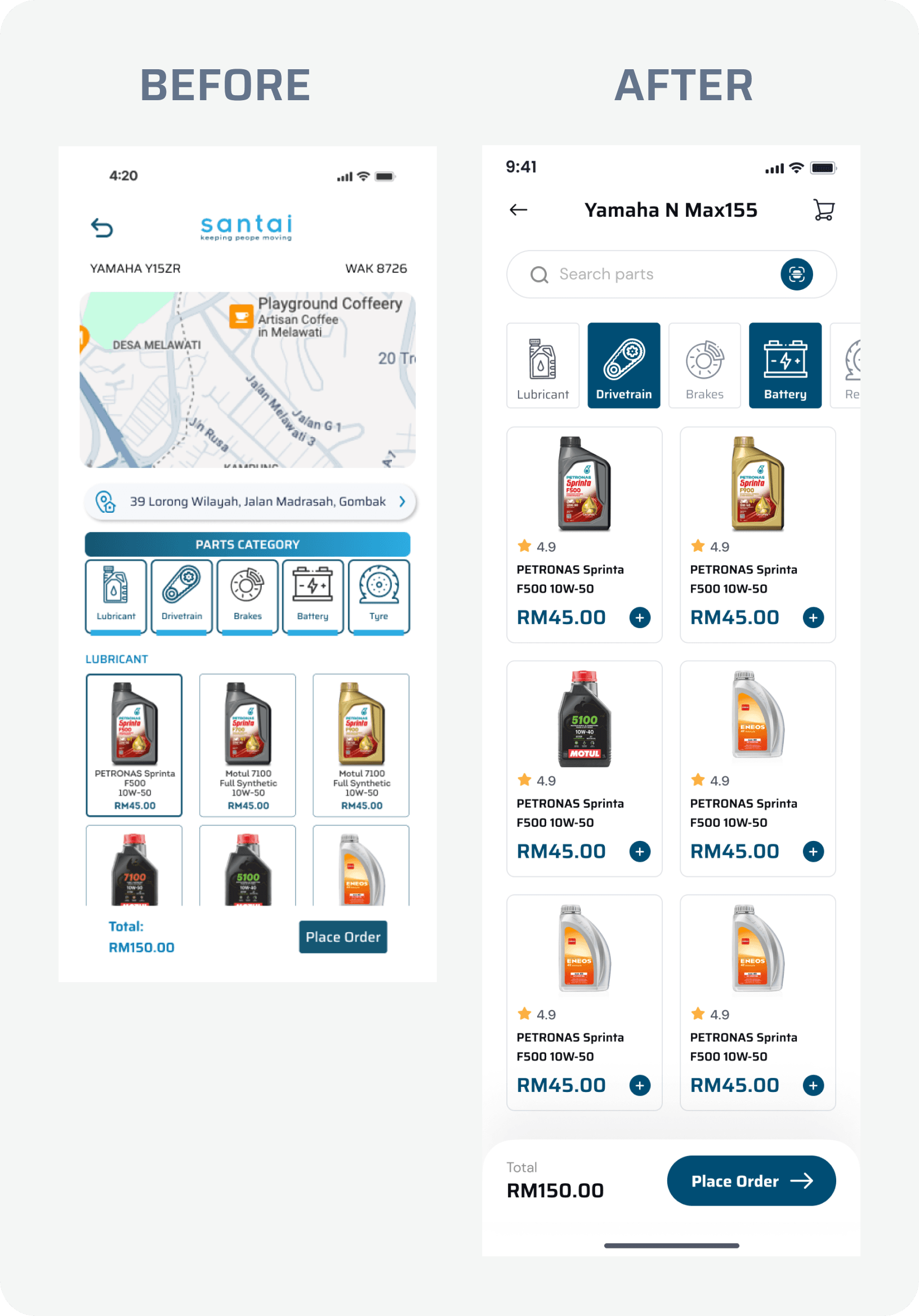
When designing the Search Product screen, our goal was to create a clear and efficient shopping experience for motorcycle owners. We observed that users often struggled to find specific parts due to scattered navigation and inconsistent layout. To address this, we structured the screen around intuitive category tabs such as Lubricant, Drivetrain, Battery, and Brakes allowing users to filter parts quickly based on their needs.
The product grid was redesigned for clarity and consistency. Each item clearly displays its name, price, rating, and an easy-to-tap “+” button for selection. To reduce friction, we added a persistent bottom bar that shows the total price and a prominent “Place Order” button, ensuring users always know their cart status without needing to navigate away.
This design focuses on reducing cognitive load, increasing speed of decision making, and creating a seamless transition from browsing to checkout. The layout prioritizes utility while keeping the interface clean and approachable for all user levels.
Checkout Screen
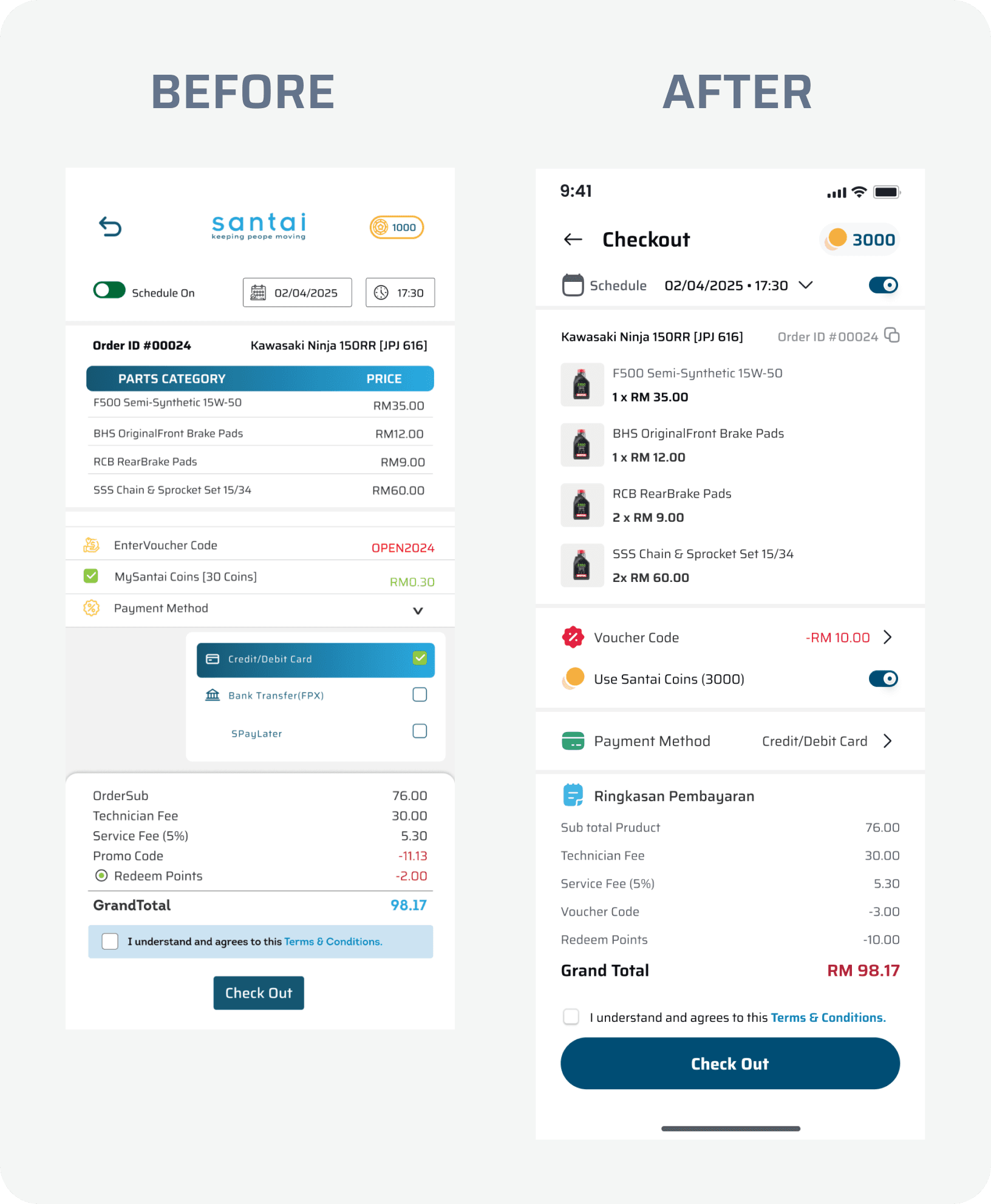
The checkout process is a critical moment where users finalize their decision. In the original design, although all necessary elements were present item list, payment method, vouchers, fees the layout was dense and visually unbalanced, making it difficult for users to review their selections and understand the final cost clearly.
Our redesign focused on breaking down complexity and guiding users through a linear, scannable flow. We introduced a cleaner visual hierarchy by separating major sections: order summary, voucher input, coins usage, payment selection, and cost breakdown. Important details like appointment schedule, bike info, and Order ID were retained but subtly integrated to reduce visual noise.
We also made the “Use Coins” and “Voucher” features more interactive and toggle-based, allowing users to see real-time updates on price adjustments. The fee breakdown was redesigned in natural language (e.g., “Service Fee (5%)”) with aligned values to enhance readability and transparency.
Lastly, the primary “Check Out” button was anchored to the bottom with clear agreement terms just above it ensuring users can complete the process confidently without needing to scroll up and down repeatedly.
This redesign aimed to reduce decision fatigue, build user trust, and ensure that the checkout process felt transparent, smooth, and easy to complete especially for first-time users or those less familiar with digital payments.
The Pre-Service Inspection Screen
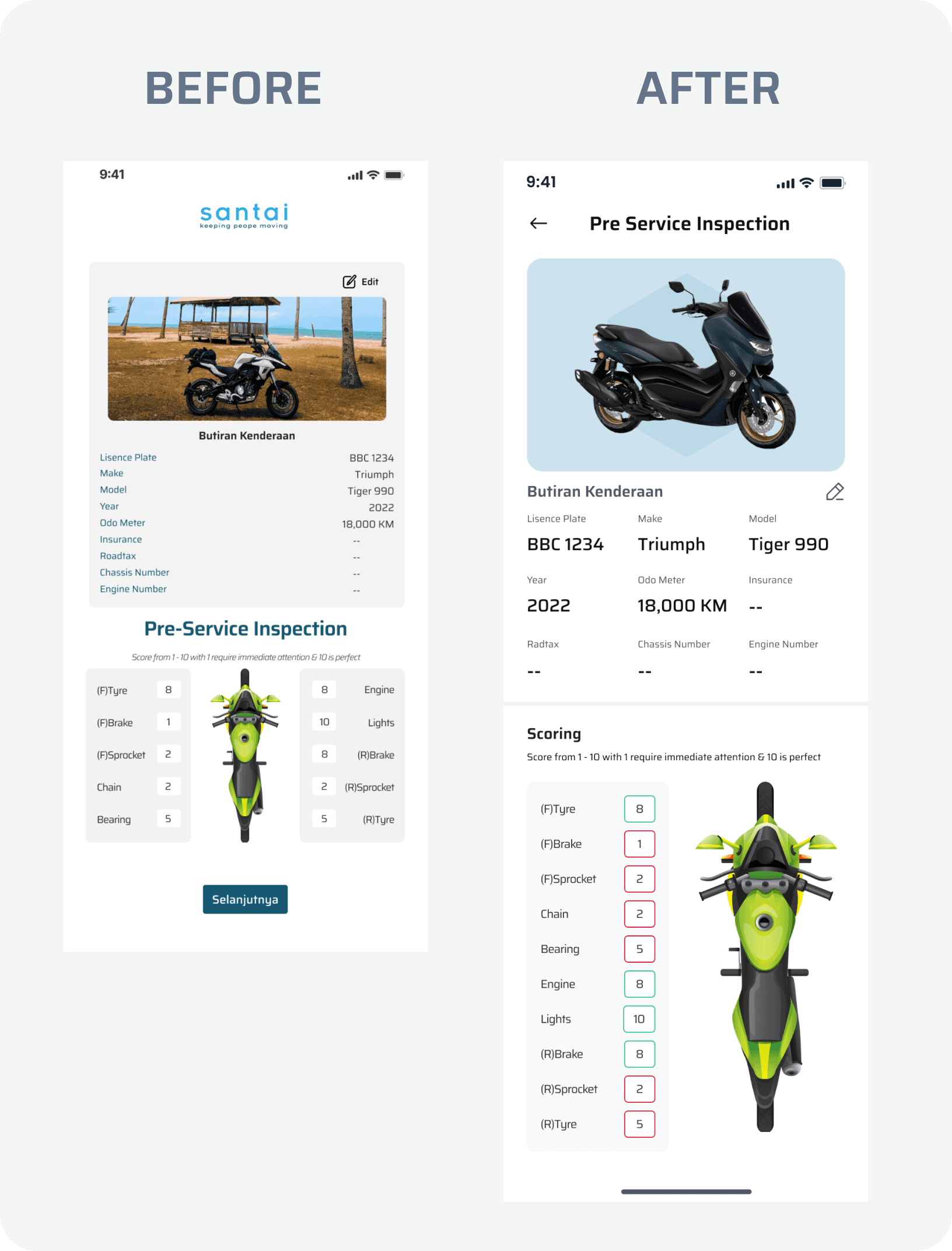
The Pre-Service Inspection screen plays a vital role in documenting vehicle condition before maintenance. However, the original design presented vehicle details and inspection scores in a flat, text-heavy layout, which could be overwhelming and lacked visual clarity. Key data such as tyre, brake, and sprocket conditions were not emphasized, making it harder for technicians and users to quickly assess vehicle health.
In the redesigned screen, we focused on enhancing information structure and visual communication. We retained all vehicle details but used better alignment, bold typography, and consistent spacing to improve readability. The motorcycle image was replaced with a clean, isometric illustration to serve as a visual anchor that orients users and links scores to real bike parts spatially.
The scoring section was restructured using a side-by-side layout with visual color-coded indicators (red, green, neutral) to reflect urgency at a glance. This allows technicians and users alike to quickly identify which components need immediate attention, without having to interpret every score manually.
The design improves cognitive mapping between scores and parts, highlights potential risks, and adds professionalism to the inspection process. The enhanced layout supports faster communication between service staff and customers while reinforcing transparency and trust.
The Result
The redesign reduced friction, improved usability, and shortened the time needed to complete key tasks like ordering parts or booking service appointments. A clear interface, consistent design language, and prioritizing user goals create trust, improve efficiency, and elevate the overall service experience.